

Agent Skills
Vita AI agents operate through a skill-based architecture. Each agent type is configured with a specific set of skills, and the platform dynamically assembles the corresponding tools at runtime. This enables agents to perform real-world work — writing and executing code, interacting with web applications, generating documents, and communicating via email — all within isolated sandbox environments.
Built-in Skills
Full desktop interaction within isolated sandbox environments:
- Screenshot — Capture the current desktop view for vision-based reasoning
- Click & Type — Interact with UI elements by clicking at coordinates and typing text
- Keyboard — Press keys and key combinations for shortcuts and navigation
- Mouse Move & Drag — Move the cursor and perform drag operations
- Scroll — Scroll in any direction within applications
Screenshots are streamed to the UI in real-time, and the agent uses multi-modal vision to reason about what it sees on screen.
Natural-language-driven web interaction powered by the Model Context Protocol (MCP):
- Intent-Based Actions — Agents interact with web pages using natural language descriptions (e.g., "click the submit button") rather than brittle CSS selectors or XPath queries, making automations resilient to UI changes
- Dynamic Tool Discovery — Browser tools are discovered at runtime from the MCP server, so new capabilities become available without code changes
- Multi-Modal — Browser screenshots are returned directly to the agent for visual reasoning, enabling it to understand and react to page state
A pluggable artifact system for creating and editing documents:
- Code — Generate and execute Python, JavaScript, or TypeScript with live output
- Text — Create Markdown documents with real-time streaming preview
- Spreadsheet — Generate structured CSV data with meaningful headers
Documents are streamed to the UI as they're generated and persisted for later use.
Agents can send and receive emails with a unique identity per task:
- Send — Compose and send emails to external recipients
- List — Check the inbox for incoming messages
- Read — Read full email content and attachments
Each agent task is assigned a dedicated email address, enabling agents to communicate with stakeholders, send reports, and receive replies autonomously.
Isolated Linux environments for safe code execution:
- Bash — Execute terminal commands with full shell access
- File System — Read, write, and manage files within the sandbox
- Network — Access external APIs and services
- Code Execution — Run Python, Node.js, and shell scripts
Sandboxes are created on-demand and isolated per task, ensuring agents can execute code safely without affecting other workloads.
How Agents Use Skills
Each built-in agent type comes with a curated set of skills pre-installed and ready to use. Different agent types are suited to different workflows — for example, a social agent has browser and computer skills for posting across platforms, while a general-purpose agent has computer and email skills for broad task automation.
At runtime, the platform assembles only the tools that match the agent's configured skills. This keeps each agent focused and efficient — agents only load the capabilities they need for their role.
Extending Agents with Custom Skills
Beyond the built-in defaults, Vita features a native skill marketplace and management system that allows you to discover and install community-contributed skills from across the ecosystem.
The Skill Marketplace
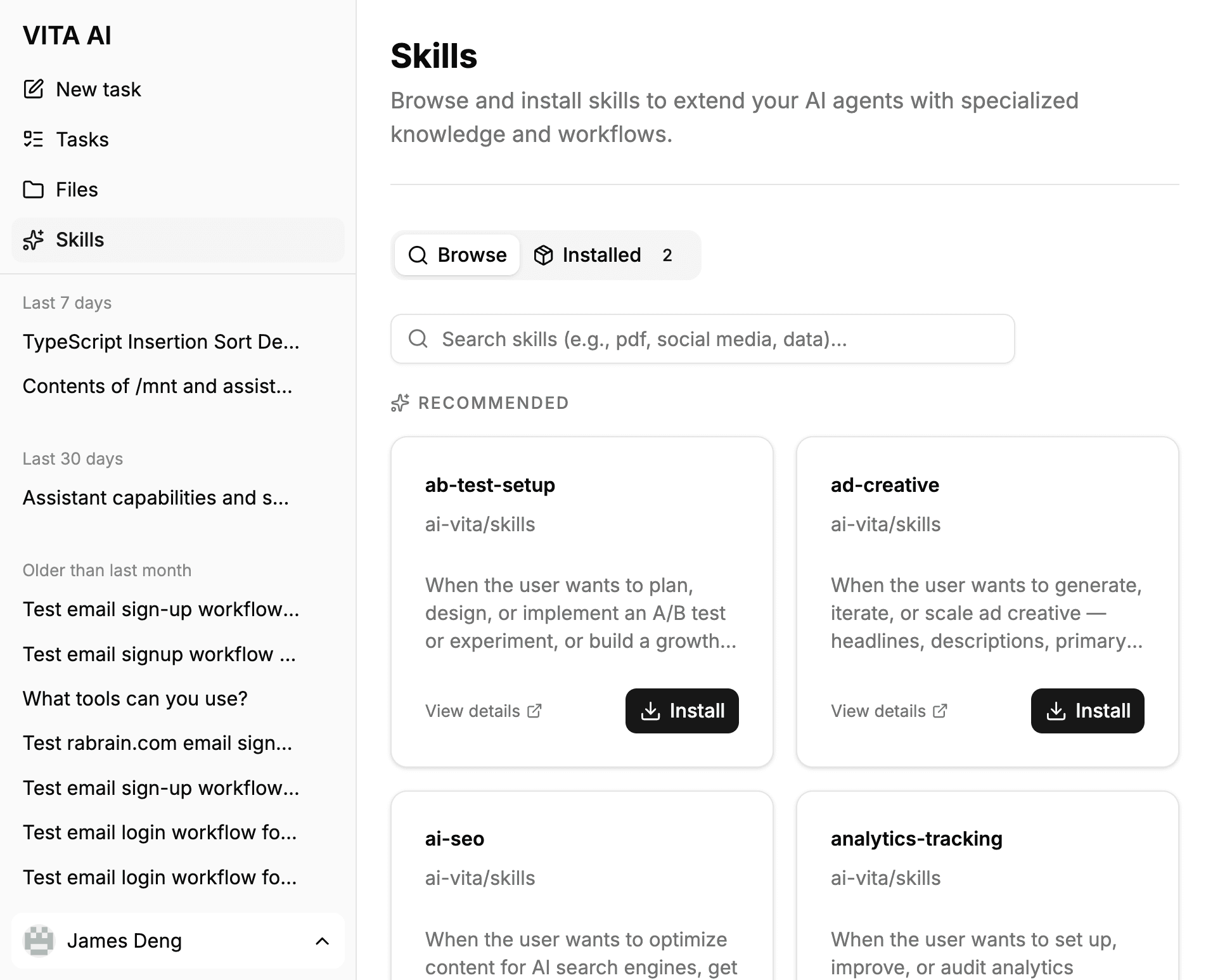
The integrated marketplace provides a unified interface for managing your agent's capabilities:
- Discovery — Search the extensive skills.sh catalog for specialized tools or browse curated Recommended skills from Vita's official repository.
- Dynamic Learning — Once a skill is installed, it is automatically discovered and loaded by the agent at the start of every task. Agents use built-in tools to read skill instructions and supporting files, enabling them to "learn" and apply new capabilities instantly.
- One-Click Management — Easily install or remove skills with a single click. The system automatically organizes skill files within your private volume and maintains a local registry for instant discovery.
To access the marketplace, click on Skills in the sidebar navigation.
Persistent Skill Volumes
When you install a skill, it is persisted to your private Skill Volume. Think of this as personal cloud storage for your agent's capabilities.
- Stateful Persistence — Installed skills remain in your volume across sessions. You don't need to reinstall them when starting a new task or switching between agents.
- Unified Library — Your skill volume is attached to every agent you start. If you install a PDF processing skill while using a Social agent, that same skill is immediately available to your Research agent.
- Sandbox Security — Skills are executed within your isolated sandbox environment but loaded from your persistent volume, ensuring both security and convenience.