

Your app's next user isn't a person — it's an agent

February 28th, 2026 • 10 min read
TL;DR
- Software interaction has shifted three times: desktop apps gave us GUIs, cloud apps gave us APIs, AI-native apps give us natural language and agent-driven execution
- In the AI-native era, the primary consumer of an application is no longer a human — it's an agent
- This changes how applications should be built: as sets of atomic, composable skills with addressable content and structured interfaces — not monolithic feature sets behind complex UIs
- The applications that define the next decade will be designed for agents from the ground up
Every few decades, the way humans interact with software undergoes a fundamental shift. Not a gradual improvement — a structural change in what it means to use an application.
We've lived through two of these shifts already. The first moved us from command lines to graphical interfaces. The second moved our applications from local machines to the cloud. Now we're in the early stages of a third: applications designed not for humans clicking through interfaces, but for AI agents executing on our behalf.
Each era can be understood through the same four-part structure: the user, the interaction protocol (how intent is communicated), the execution environment (where applications run), and the applications themselves. What changes across eras is not the structure — it's what fills each slot.
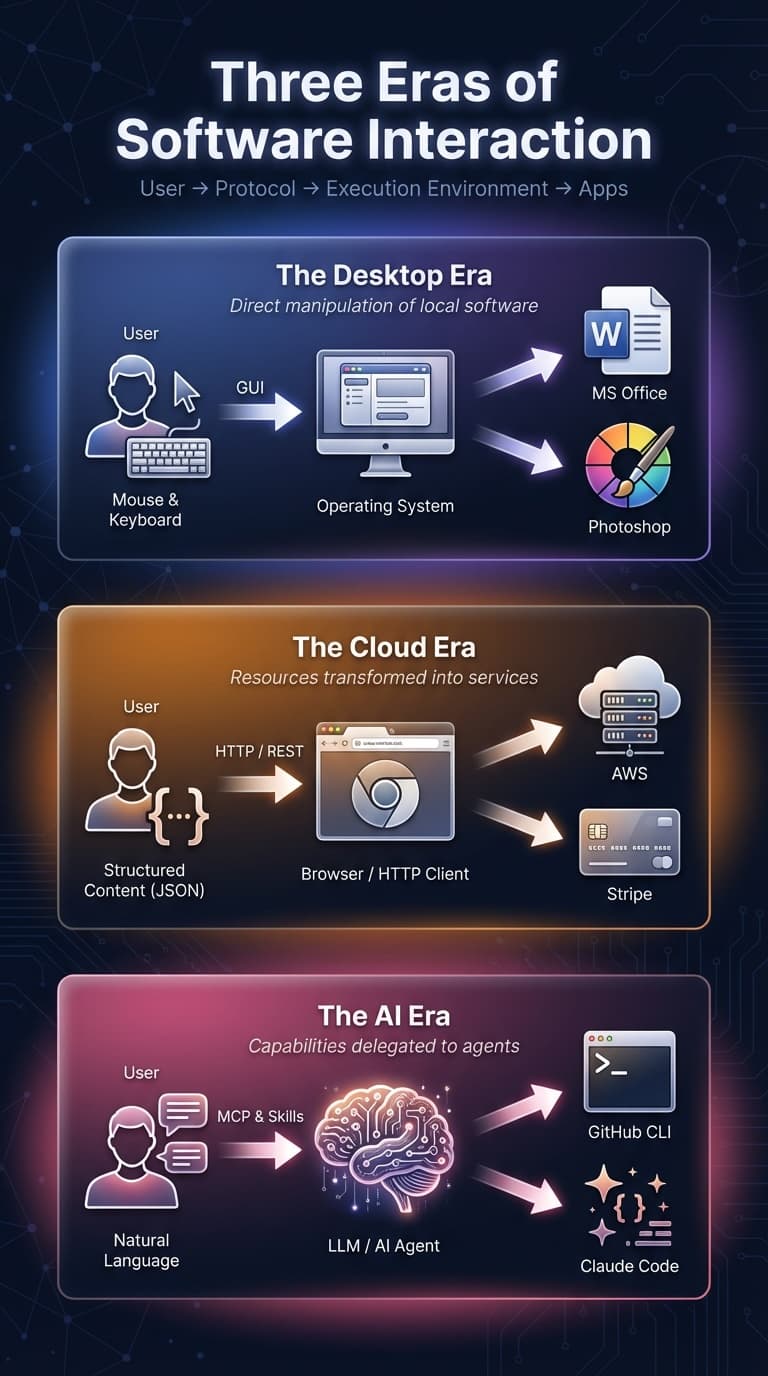
Era 1: Desktop Applications
Interaction protocol: Graphical user interfaces — menus, dialogs, toolbars, mouse and keyboard.
Execution environment: The personal computer's operating system.
The desktop era gave us software of extraordinary power and depth. Photoshop, Excel, AutoCAD, the Microsoft Office suite — these applications defined entire professions. A skilled Excel user could model complex financial systems. A Photoshop expert could produce work indistinguishable from physical media.
The defining characteristic of this era was direct manipulation. You pointed at things on screen and moved them. You clicked buttons and watched results appear. The metaphor was the physical desktop — files, folders, trash cans — translated into pixels.
This model had profound strengths. Desktop applications were responsive because everything ran locally. They were powerful because they had direct access to hardware — GPU rendering, local filesystem, peripherals. Complex workflows could be built through deep feature sets that evolved over decades.
But the limitations were equally fundamental. Data lived on a single machine. Collaboration meant emailing files back and forth and manually merging changes. Software distribution required physical media or large downloads. Updates were infrequent and disruptive. Every user's environment was slightly different, creating an endless matrix of compatibility issues.
The application boundary was the machine boundary. Your software could only see what was on your hard drive, and you could only use it when you were sitting at that specific computer.
Era 2: Cloud Applications
Interaction protocol: HTTP, REST and GraphQL APIs, the web browser as universal client.
Execution environment: Remote servers, data centers, hyperscale cloud infrastructure.
The cloud era did something radical: it decoupled applications from the machines they ran on. Software became a service. You didn't install it — you navigated to a URL.
This shift was driven by a deeper transformation: resources became services. AWS turned physical servers into API calls. Stripe turned payment processing — previously requiring merchant accounts, POS hardware, and banking relationships — into a few lines of code. Twilio did the same for telecommunications. Each of these companies took something that required physical infrastructure and capital expenditure and turned it into an on-demand service accessible over HTTP.
The implications cascaded. When infrastructure is a service, anyone can build and deploy software. When payment is a service, anyone can monetize. When authentication is a service (Auth0, Firebase Auth), anyone can secure their application. The barrier to creating software dropped by orders of magnitude.
Cloud applications brought collaboration as a default rather than an afterthought. Google Docs didn't just move Word to the browser — it made simultaneous multi-user editing the baseline expectation. GitHub didn't just host code — it made collaborative development workflows (pull requests, code review, issue tracking) native to the platform.
The API became the fundamental interface. Applications weren't just used by humans through browsers — they were composed by developers through programmatic interfaces. Stripe's API let any application accept payments. Twilio's API let any application send messages. The cloud era's architectural insight was that every application should also be a platform.
But for all this progress, cloud applications still assumed a human at the controls. Someone had to navigate the browser, fill in forms, click buttons, read dashboards, and decide what to do next. The interaction protocol changed from mouse-and-keyboard on a desktop to mouse-and-keyboard in a browser. The execution environment moved to the cloud. But the user remained a human, manually orchestrating every action.
Era 3: AI-Native Applications
Interaction protocol: Natural language, structured tool calls, agent-to-agent protocols (MCP, OpenAPI with agent extensions).
Execution environment: The AI agent runtime — a context window backed by model inference, tool access, and sandboxed compute.
We are now entering a third era, and it changes the most fundamental assumption of the previous two: the primary consumer of an application may not be a human.
Consider a concrete example. GitHub CLI makes creating a pull request faster than doing it through the web GUI. But with a code agent like Claude Code, you don't even run the CLI yourself — you describe what you want ("create a PR with a summary of the changes"), and the agent reads through your git history, drafts a title and description, and executes the command. The agent is the user. The CLI is the application. Natural language is the protocol.
This is not a hypothetical future. It is happening now, at scale, across developer tooling, customer support, data analysis, and operations. The question is no longer whether AI agents will consume applications — it's how applications should be designed for this new consumer.
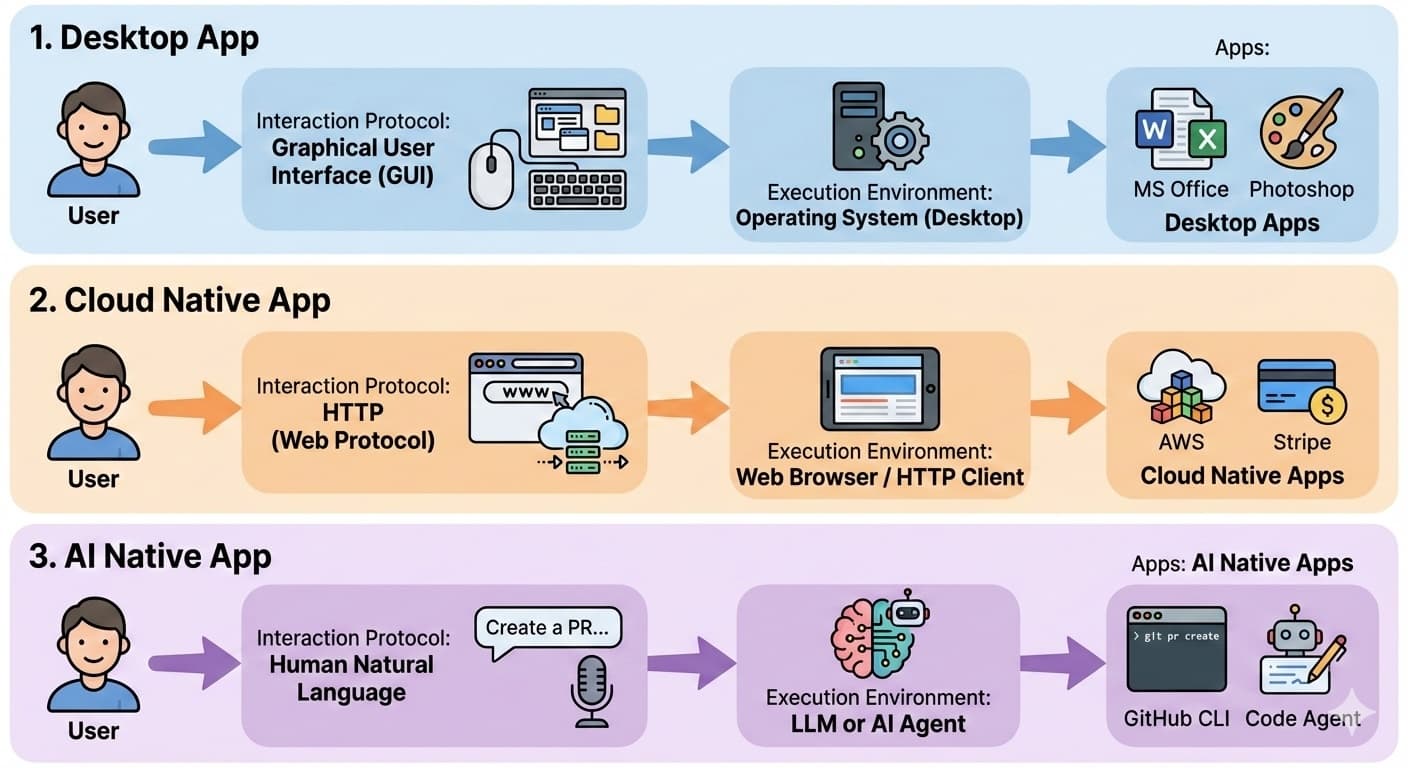
What Agent-Driven Execution Looks Like
To understand what changes in this era, consider three scenarios where AI agents replace the manual orchestration humans perform across multiple applications every day.
Customer support. A customer emails about a defective product. Today, a support representative reads the email, switches to the CRM to look up the customer's account, checks order history in another tab, opens the payment dashboard to process a refund through Stripe, then returns to email to send confirmation. Five applications, ten minutes of tab-switching. With an AI agent monitoring the support inbox, this resolves itself: "Handle the latest customer complaint." The agent reads the email, identifies the issue, looks up the customer's account, checks order history, processes the refund, and sends confirmation — coordinating across four services, zero human intervention.
Incident response. A PagerDuty alert fires at 3 AM. Today, an on-call engineer wakes up, opens Datadog dashboards to check metrics, identifies the failing service, reviews recent deployments, and manually triggers a rollback through ArgoCD. With an AI agent watching the alert feed: "Investigate the currently firing alert and take corrective action." The agent queries monitoring metrics, correlates the failure with a recent deployment, and triggers a rollback — what took a groggy engineer thirty minutes takes the agent two, and the engineer never wakes up.
Expense reimbursement. An employee returns from a business trip with a stack of receipts. Today, they photograph each one, open Expensify, manually create entries, categorize each expense (taxi, meals, lodging), attach the receipt images, create a report, and submit it for approval. With an AI agent: "Here are my receipts from the trip. Submit my expenses." The agent reads the images, extracts dates and amounts, categorizes each expense, fills in the required fields, creates the report, and submits it — an hour of tedious data entry becomes a single message.
In each case, the pattern is the same: the user states intent in natural language, and the agent plans and executes across multiple independent applications. No one navigates between browser tabs. No one fills in forms. The user describes what they want, and the agent orchestrates the rest.
This collapses the distinction between "using an application" and "automating a workflow." In previous eras, using an app was manual and automating it required programming. In the AI-native era, they converge — expressing intent is automation.
Design Principles for AI-Native Applications
These examples only work when the underlying applications are designed for agent consumption. Four principles emerge from what the examples require:
1. Atomic Capabilities
Each service in the examples above does one thing well. Stripe processes payments. PagerDuty delivers alerts. Expensify manages expense reports. ArgoCD handles deployments. The agent's power comes not from any single service, but from composing these focused capabilities into workflows no single vendor designed.
This mirrors the Unix philosophy ("do one thing well") but applied at the service level. Instead of a massive project management suite, an AI-native approach offers separate capabilities for task creation, status updates, time tracking, and reporting — each independently invocable by any agent. When capabilities are atomic, agents can mix tools from different providers to assemble workflows that no single vendor anticipated.
The emerging format for these atomic capabilities is the skill — a self-contained package that bundles a description (so the agent knows when to use it), instructions (so the agent knows how), and optional scripts and assets (so it can execute). An AI-native application is, at its core, a set of skills. Stripe's payment processing, Expensify's expense submission, ArgoCD's deployment rollback — each is a skill an agent can discover, understand, and invoke. Where cloud-era applications exposed their capabilities as APIs, AI-native applications expose them as skills.
2. Addressable Content
Notice that every key object in the examples has an identifier. Order #4521. A PagerDuty alert ID. A specific deployment name. Receipt images with extractable metadata. If an agent cannot reference something precisely, it cannot reason about it or pass it to another tool.
GitHub exemplifies this well. Every issue has a short ID (repo#123). Every pull request has a URL. Every commit has a hash. Every line of code in every file at every point in history is addressable. This is why code agents work so effectively with GitHub — they can refer to specific artifacts precisely and unambiguously.
Jira gets this right too. A story ID like WEB-42 is compact enough to mention in conversation and precise enough to look up programmatically. When someone tells an agent "fix the bug in WEB-42," the agent knows exactly what to retrieve.
Contrast this with applications where content is not easily addressable. A document editor that doesn't expose paragraph-level URIs forces agents to work with the entire document — or to rely on fragile positional references ("the third paragraph in section 2") that break when content changes. Email clients that don't surface message IDs make it difficult for agents to reference specific conversations.
The rule is simple: if it doesn't have a URI, an agent can't work with it reliably.
3. Adaptive Interfaces
In the desktop and cloud eras, applications presented fixed interfaces — the same screens, the same layouts, the same navigation for every user in every context. Personalization existed but was limited to themes and dashboard configurations.
AI-native applications can generate interfaces dynamically. If a user frequently performs a specific sequence of actions, the agent can create a shortcut or a custom workflow. If a particular view is more useful for a given task, the agent can assemble it on the fly.
This extends to the idea of custom commands, hooks, and automation rules that emerge from usage patterns rather than being predefined by the application developer. The interface becomes a conversation between the user's habits and the agent's capabilities.
4. Agent-Mediated Execution
This is the defining pattern visible in all three examples: the user states intent, and an agent plans and executes across multiple applications. The customer support agent coordinated four services. The incident response agent moved from monitoring to remediation. The expense agent processed images, filled forms, and submitted reports. In none of these cases did the user interact directly with any individual application.
The agent is the new universal client — the way the browser was the universal client of the cloud era. But where the browser presented a human with interfaces to navigate, the agent navigates them autonomously.
The Bridge Pattern: Each Era Absorbs the Previous
Here is the most important structural observation about these transitions: new eras do not replace old ones. They wrap them.
Cloud applications did not make desktop software disappear overnight. Instead, bridge technologies emerged. Citrix and virtual desktop infrastructure (VDI) let cloud-era users access desktop applications through a browser. Web-based versions of Office coexisted with installed versions for years — and still do. Google Docs offered an alternative to desktop word processors, but it did not eliminate them.
The same pattern is playing out now. AI-native applications are not replacing cloud services — they are wrapping them. The bridge technology of this transition is the MCP server: a thin wrapper that exposes an existing REST API as a set of structured tool calls that an agent can discover and invoke.
The MCP ecosystem today consists largely of these bridges. Thousands of MCP servers wrap existing services — GitHub, Slack, Jira, databases, monitoring tools — making them accessible to agents without the services themselves being redesigned. This is the cloud-to-AI-native equivalent of Citrix for the desktop-to-cloud transition.
But bridges are transitional. The applications that will define the AI-native era won't be wrappers around cloud APIs. They will be built from the ground up with atomic capabilities, addressable content, and agent-first interfaces. The MCP server will be the native interface, not an afterthought bolted onto a web dashboard.
| Desktop Era | Cloud Era | AI-Native Era | |
|---|---|---|---|
| User | Human at a PC | Human in a browser | Human or AI agent |
| Interaction | GUI (mouse/keyboard) | HTTP/API (browser, CLI) | Natural language / tool calls |
| Execution Env | Local operating system | Remote servers / cloud | Agent runtime + sandboxed compute |
| App Design | Feature-rich monoliths | API-composable services | Atomic, addressable capabilities |
| Bridge from prior | — | Remote desktop, web wrappers | MCP servers over REST APIs |
Adaptive Execution vs. Persistent Workflows
A key tension emerges in the AI-native era: should agents figure out what to do on the fly, or should they follow predefined scripts?
Adaptive Execution
The agent interprets a goal, plans steps dynamically, and adapts as conditions change. You say "handle the customer complaint," and the agent decides to look up the account, check order history, draft a response, and escalate if necessary — all based on what it discovers along the way.
Strengths: Flexible, handles novel situations, requires no upfront scripting, adapts to changing conditions mid-execution.
Weaknesses: Non-deterministic (the same goal may be handled differently each time), expensive (requires LLM inference at every decision point), harder to audit and predict.
Persistent Workflows
A fixed sequence of steps — possibly with branching logic — that runs deterministically. "When a customer emails about a refund, look up their order, check the refund policy, process the refund if eligible, and send a confirmation."
Strengths: Predictable, efficient (no LLM calls per step), auditable, fast.
Weaknesses: Brittle when conditions change, requires maintenance, cannot handle unanticipated scenarios.
The Synthesis
These are not opposing paradigms — they are two ends of a spectrum. The practical pattern is: start with adaptive execution to explore and solve a problem, then crystallize the solution into a persistent workflow once the approach is proven.
This mirrors the relationship between an interpreter and a JIT compiler. The interpreter handles code flexibility — it runs anything, adapts to any input, but pays a performance cost for every instruction. The JIT compiler observes which paths are taken repeatedly and compiles them into optimized machine code. You get the flexibility of interpretation and the efficiency of compilation.
Applied to AI-native applications:
Customer support: Recall the refund example. The first time an agent encounters a novel complaint, it works adaptively — investigating the issue, trying different resolution approaches, deciding when to escalate. But once a pattern emerges (say, a specific type of defective-product refund), the successful sequence gets captured as a persistent workflow that runs efficiently and predictably for all similar future cases.
Incident response: The first time an agent encounters an unfamiliar alert, it triages adaptively — checking logs, querying metrics, testing hypotheses. Once the runbook is proven (alert type X correlates with bad deploy, fix is rollback via ArgoCD), it becomes an automated workflow triggered by matching alerts.
Expense reimbursement: An agent processes its first unusual expense report adaptively — interpreting receipt images, handling edge cases like foreign currency or split bills. The successful patterns are persisted as workflow rules for standard cases, while the agent continues to handle exceptions adaptively.
The concrete mechanism for this crystallization is the skill. A proven workflow pattern — the sequence of steps, the decision logic, the tool invocations — gets captured as a reusable skill that any agent can invoke. The customer support refund workflow becomes a skill. The incident response runbook becomes a skill. The expense categorization rules become a skill. Each starts as adaptive exploration and graduates into a composable, shareable capability.
The best AI-native applications will support both modes natively — adaptive execution for exploration and edge cases, persistent workflows packaged as skills for efficiency and predictability — with a natural path to graduate from one to the other.
What This Means for Builders
If you are building software today, five principles will determine whether your application thrives in the AI-native era:
1. Design for composability. Break your product into atomic, single-purpose capabilities that agents can discover and invoke independently. Resist the monolith impulse. A well-designed set of small tools is more valuable to an agent than a sprawling feature set behind a complex UI.
2. Make content addressable. Give every meaningful unit of content — every document, every record, every message, every paragraph — a stable, compact identifier. If an agent cannot point to it, the agent cannot work with it.
3. Expose structured interfaces. Natural language is the user-facing protocol. Structured schemas (MCP, OpenAPI, GraphQL) are the agent-facing protocol. Both matter. The structured interface is what makes your application reliably automatable.
4. Support both adaptive and workflow execution. Build systems that allow agents to execute dynamically today, with the ability to capture and replay successful patterns as deterministic workflows tomorrow. The interpreter-to-compiler gradient is your architecture.
5. Accept coexistence. Your desktop and cloud applications will not vanish. Design AI-native layers that wrap and extend them rather than replacing them wholesale. The bridge pattern is not a compromise — it's how eras transition.
Conclusion
The three eras of applications are not a prediction — they are an observation. Desktop applications still run on millions of machines. Cloud applications power the modern economy. AI-native applications are emerging now, built on agent runtimes, natural language protocols, and composable capabilities.
The pattern across all three transitions is the same: the execution environment shifts, the interaction protocol shifts, and the design philosophy of applications shifts with them. But the previous era does not disappear. It gets absorbed, wrapped, and extended.
For builders, the opportunity is clear. The applications that will define the next decade are being designed right now — with atomic capabilities, addressable content, and agent-first interfaces. Whether you are building a new product or evolving an existing one, these principles are the foundation.
At Vita AI, we are building AI-native work infrastructure: autonomous coworkers that operate through skills, sandboxed execution environments, and composable tool interfaces. See how it works or get started today.